
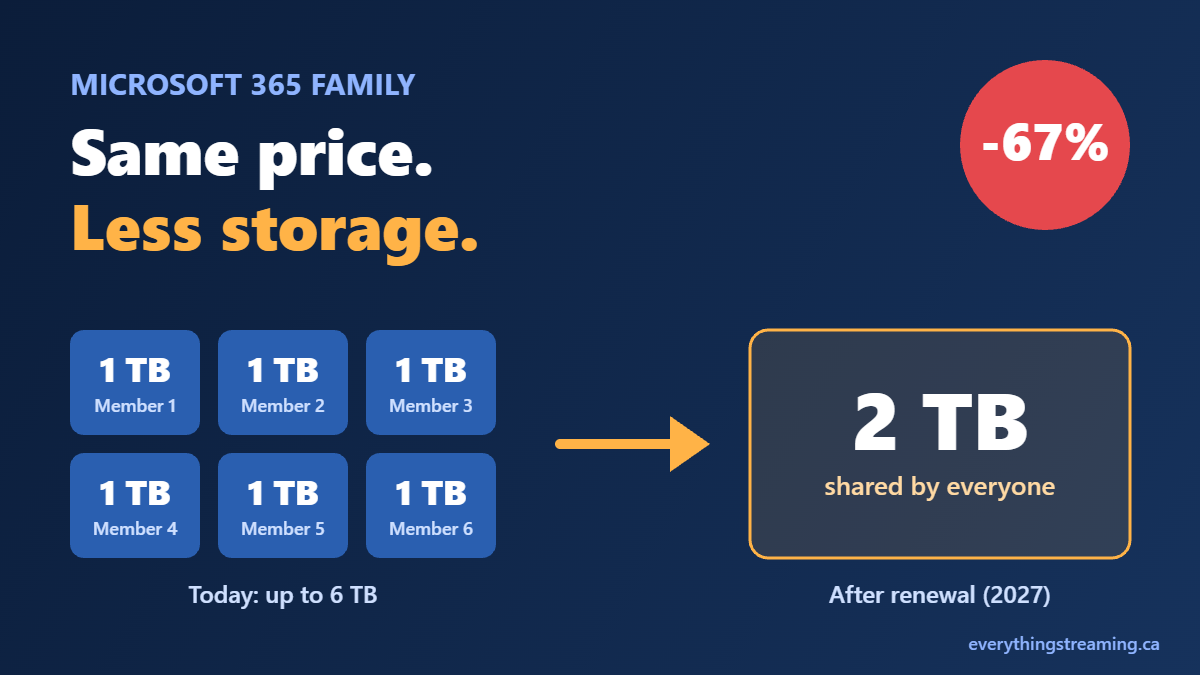
For years, Microsoft 365 Family was one of the better deals in tech: up to six people, the full Office apps, and 1 TB of OneDrive storage each. In January 2025, Microsoft raised the price (to $145 a year in Canada) and added Copilot AI for the plan owner. Now, less than two years later, the storage is shrinking and the AI is being spread thinner. The price isn’t going down.
That’s shrinkflation: same price, less in the box.
What’s changing, and when
Microsoft announced the changes on October 8, 2026, and has been emailing subscribers that the updates will roll out “over the coming months.” Only the storage change has a firm date: existing Family and Premium subscribers switch at their first renewal on or after May 2, 2027, while new subscribers appear to get the shared storage right away. The AI changes have no date yet, and Microsoft’s own email notes that timing is subject to change. Microsoft says it will email again before each change takes effect.
1. Microsoft 365 Family storage: from 6 TB to a shared 2 TB
Today: each member gets their own 1 TB. A full six-person household has up to 6 TB in total.
After your renewal: the whole household shares a single 2 TB pool.
For a full household, that means Microsoft 365 Family storage shrinks by about two-thirds (67%). Your files stay private to you, and you can buy extra storage that gets added to the shared pool, but that’s more money for space you were already paying for. Microsoft says some existing subscribers may receive bonus storage at renewal, without saying how much or who qualifies.
Microsoft’s pitch is that a shared pool is more flexible: one person who needs lots of space can use more than 1 TB. That’s true for a household where one person stores a lot and everyone else barely uses OneDrive. For families where several people back up phones, photos and school work, it’s simply less.
2. Copilot for everyone, but one shared allowance
Today: only the plan owner gets Copilot in the Office apps, with 60 AI credits a month. Other members don’t get Copilot at all.
After the change: every member gets Copilot, and Microsoft says your individual AI feature limits will become “a single AI usage allowance” that the whole household shares and can spend on whichever AI features it uses most.
Microsoft hasn’t published how big that shared allowance will be. When we asked Copilot itself, it told us the allowance stays at 60 credits a month for the plan. If that holds, the owner who had 60 credits to themselves now shares them with up to five other people, and the credits run out sooner. Parents do get controls to manage AI access for younger members, but nothing in Microsoft’s announcement says the allowance gets any bigger to cover the extra people.
It’s the same move as the storage change, from a different angle: more people, same (or smaller) pie.
3. Run out? Your only option is to upgrade
Family subscribers can’t buy extra AI credits. Once the monthly allowance is used up, credit-based features stop until the next month. To buy more, you have to move to Microsoft 365 Premium, which costs $270 a year in Canada, compared with $145 for Family. That’s $125 more a year, almost double.
To be fair about what Premium includes: Microsoft says the owner gets “extensive” Copilot usage rather than 60 credits, plus extra tools such as the Researcher and Analyst agents, and the option to buy more credits. But Microsoft doesn’t publish a number for “extensive,” and Premium gets the same shared 2 TB of storage as Family. You pay almost twice as much and get no extra space.
The bottom line: less Microsoft 365 Family storage, same price
Here’s the sequence for Microsoft 365 Family:
- 2025: the price went up, with Copilot added for the plan owner.
- 2027 renewals: storage shrinks from up to 6 TB to a shared 2 TB.
- Coming: Copilot opens to the whole household, but from one shared allowance.
- Want more AI? Upgrade to Premium at nearly double the price.
Some households, mainly those where one person uses most of the Microsoft 365 Family storage, may barely notice. But for the average family that signed up because the plan was generous, this is a clear reduction in value at the same price. The changes are framed as flexibility and sharing. In practice, the one who benefits is Microsoft.
What you can do now
- Check your storage. Add up how much OneDrive space everyone in your household uses today. If it’s well under 2 TB, the storage change may not affect you.
- Note your renewal date. The change applies at your first renewal on or after May 2, 2027. Watch for Microsoft’s email.
- Compare before you renew. Look at what other cloud storage and office suites cost for your family before paying for extra storage or Premium.
It’s the same lesson as our look at whether you can really trust a “free” VPN: the real cost of a service isn’t always on the price tag, so read the fine print before you renew.
Sources
- Microsoft Canada: Microsoft 365 Premium
- Thurrott: Microsoft 365 consumer subscriptions are transitioning to shared AI benefits and cloud storage
- Tom’s Hardware: Microsoft 365 slashes storage capacity for shared accounts
- Office Watch: Microsoft 365 Family Copilot sharing
- MobileSyrup: Microsoft 365 consumer subscriptions get AI, price hike
Protect your privacy while streaming. Secure your connection today.
Exclusive IPVanish Discount.
