


Everythingstreaming.ca
https://t.me/everyt
hingstreaming

On your Phone,
Swipe your screen to change pages

Protect Your Privacy. Use IPVanish
Everythingstreaming.ca
https://t.me/everyt
hingstreaming


2


If this is a new installation
Add your account details
ESTiVi 2
ESTiVi -K80

Protect Your Privacy. Use IPVanish
1
1. Update Your Playlist Settings
Go to Settings → Playlist
Open your playlist
Scroll down and turn ON “Update on app start”
2. Sort Your TV Groups
Go back up and open “Manage Groups
”Select “TV”
Choose “Group Sorting”
Select “By Name”
Use your Back button to return all the way to the main Settings menu.
3. Update Your EPG Settings
Open EPG
Turn ON “Update on app start”
Turn ON “Update on playlist name”
Use the Back button to exit Settings again.
4. Adjust Appearance (Optional but Recommended)
Go to Appearance → Colour Theme
Open Background Colour and choose Brown
Open Accent Theme and choose Orange
5. Change Audio Decoder to Software (eliminate “no sound on some
channels”)
Go to Playback
Click on Audio decoder
Select “Software”
Recommended Setting Changes for ESTivi
To ensure everything updates correctly, please follow these steps
Note: if your account has been set up for you, these setting have already been done


Everythingstreaming.ca
https://t.me/everyt
hingstreaming


General Settings
4
Protect Your Privacy. Use IPVanish
Everythingstreaming.ca
https://t.me/everyt
hingstreaming
Hide Categories you don’t use:
Go to Settings / playlist & click the playlist
name then choose Manage groups


Choose TV

Click the toggle off to hide
any category you don’t use


5
Protect Your Privacy. Use IPVanish
Everythingstreaming.ca
https://t.me/everyt
hingstreaming
Manually sort any channel
1.
Go to settings / playlists
2.
Click the playlist name
3.
Click Manage groups
4.
Click TV
5.
Click Group sorting, set to manual
6.
Click Reorder groups
7.
Click ok (to deselect the 1st channel)
8.
Scroll to the channel you wish to
sort and click on the channel
9.
move it to the position you want.

6
Protect Your Privacy. Use IPVanish
Everythingstreaming.ca
https://t.me/everyt
hingstreaming


Update the EPG
(tv guide)


7
Protect Your Privacy. Use IPVanish
Everythingstreaming.ca
https://t.me/everyt
hingstreaming


Adjust the buffer
settings
8
Everythingstreaming.ca
https://t.me/everyt
hingstreaming
Recording:
Long press the live show
you want to record.
Choose custom
recording to program,


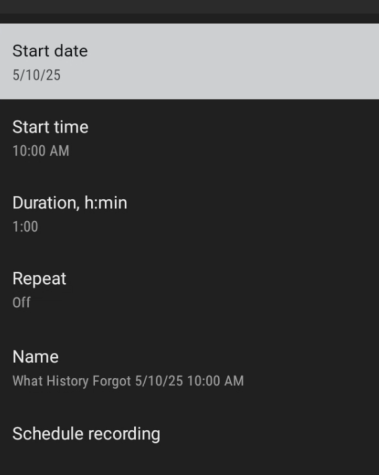
Note:
Your device has a
limited amout of storage
Rember to delete a
recording after watching
9
Protect Your Privacy. Use IPVanish
Everythingstreaming.ca
https://t.me/everyt
hingstreaming
Clear Cache
Android:
• Push the Home button on your remote • Click Settings • Click Apps • Click on the app that you want to clear the cache • Go down to Clear Cache, click it, click ok & confirm • DO NOT CLEAR DATA OR APP SETTINGS WILL BE ERASED • Go back up to Force Stop, click it & confirm • Use your back button to close the settings.Firesticks:
• Push the Home button on your remote • Click Settings • Click Applications • Click Manage Installed Applications • Click on the app that you want to clear the cache • Go down to Clear Cache, click it, click ok & confirm • DO NOT CLEAR DATA OR APP SETTINGS WILL BE ERASED • Go back up to Force Stop, click it & confirm • Use your back button to close the settings.
10
Protect Your Privacy. Use IPVanish


Everythingstreaming.ca
https://t.me/everyt
hingstreaming
We hope this has answered so
me of
your questions how to set up Your
ESTiVi App.
We welcome your feedback and
apprecieate your continued support.


Everythingstreaming.ca
https://t.me/everyt
hingstreaming

Protect Your Privacy. Use IPVanish


